




How do I apply effects to music?
Introduction.
Effects like echo, reverb etc. are widely used in the modern music. From time to time nothing more than effects can make a particular song extremely popular. You can surely remember a couple of such songs, if you think for a while.
Now, the interesting part of it is that you can apply different effects yourself to morph music, thus adding new flavor to well-known songs. It is also possible to change voice and do other fun things. You don't need to buy expensive hardware in order to do this. A computer with a sound card will suffice.
Let's take a look at AV MP3 Player Morpher, a multi-purpose program that can apply effects to music and sound.
Step 1: Download and install the program.
Download AV MP3 Player Morpher to a known location. Run setup and follow its on-screen prompts to install the application.
Step 2: Start the program. Fill out a free registration form.
Launch AV MP3 Player Morpher. The program will ask you to register your copy in order to be able to use all its functions. The registration is free, you only need to enter your name and e-mail address (free e-mail addresses at yahoo.com etc. are apparently not accepted). You will receive email with a link to a page with a code. Enter the code to complete registration.
Step 3: Add your music. Start playing and morphing.
After unlocking you can start adding your music and applying different effects.
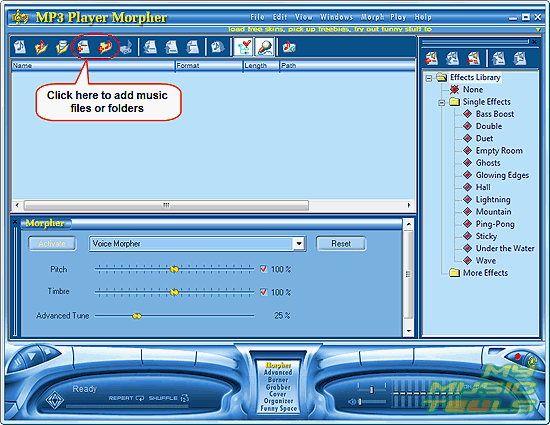
Click the "Add files" or "Add folder" button to load a music file (or a bunch of files) into the program. By the way, it is possible to use MP3 Player Morpher as a usual media player, that's when all effects are off.
In a usual "Open" dialog, browse to your files and select them.
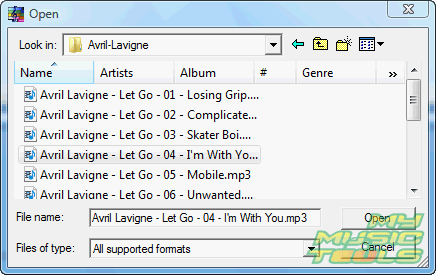
Click "Open".
Now you can simply double click any added file in the list to start playing it. Apply effects by switching them on and off in the right part of the window.
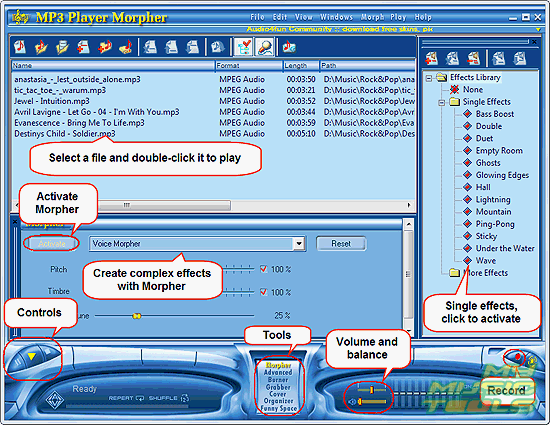
A more advanced tool for effects, Morpher, allows you to adjust settings for every effect. Click "Activate" button to activate Morpher and make adjustments in real time. If you want to restore defaults, just click "Reset".
Have fun!


Search
Related
Ask our expert
- How to share screen videos online?
- How to sort duplicate music files by ID3 tags?
- How to get quick updates on movies by director?
- How to convert multiple MIDI files into an MP3?
- How to rotate videos?
- How to convert WMA to WAV?
- How to play MIDIs on an iPhone?
- How to split an audio file into equal parts?
- How to split m4b audiobooks into chapters for free?
- How to convert videos for You Tube?
