




How to split WAV by CUE?
Introduction.
Uncompressed WAV is one of the basic audio formats for Windows operating system. Many popular audio converters use it as the intermediate format, when converting between two other audio formats (for example, FLAC to MP3, MP3 to OGG etc.). Uncompressed WAV files are lossless, which means that no audio quality is lost if you convert sound to this format.
CUE sheet is a special text file that defines start/end time of every track inside a big audio file. Information from a CUE file can be used to access tracks directly, or to split the corresponding big audio file into smaller files (tracks).
You can split WAV by CUE using a program like Visual MP3 Splitter & Joiner.
Step 1: Download and install the program.
Download Visual MP3 Splitter & Joiner to a known location. Run setup and follow on-screen instructions to install the application.
Step 2: Start the program. Open your CUE file.
Launch the WAV cutter. On the toolbar, click the "Add files" button:
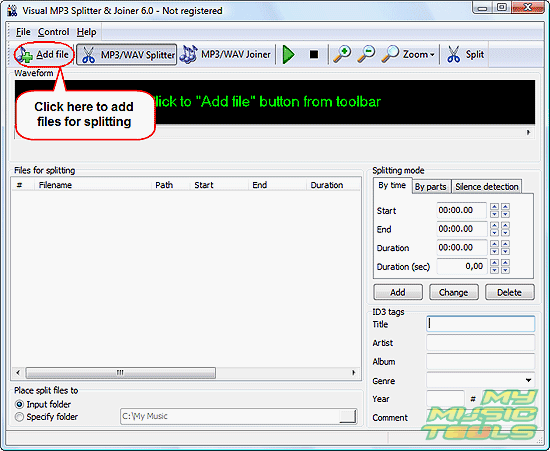
This will invoke a usual "Open" dialog.
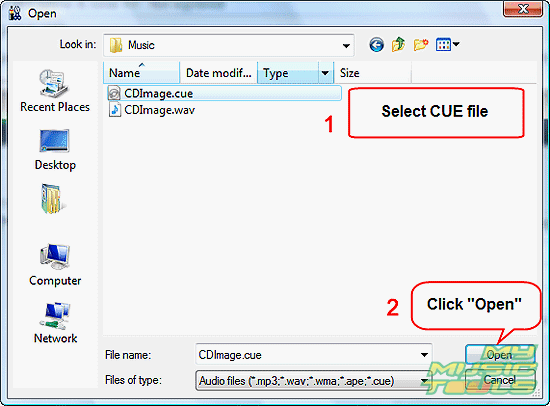
Open the location where your WAV and CUE files are stored (usually they are saved in the same folder). Select the CUE file. Click "Open".
Step 3: Cut WAV using CUE.
Information from the CUE file will be added to the list of the CUE splitter.
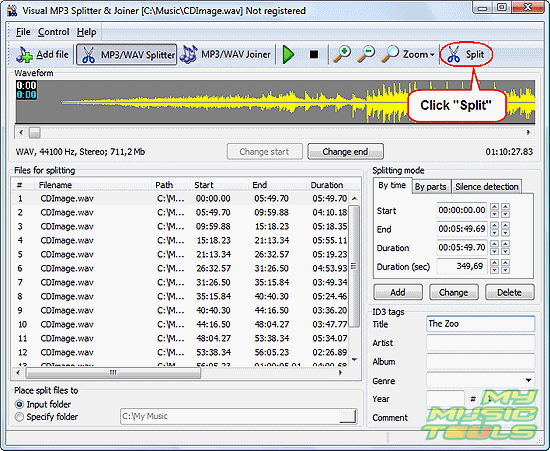
We can select every part from the split list and check it by playing it, or adjust split points. However, if your CUE file is correct, no such adjustments are necessary. You can simply click the "Split" button on the toolbar and wait for the program to cut your WAV file into individual tracks.
Split files will be saved in the output folder specified in the lower part of the window ("Place split files to"). By default split files are saved into the folder of the source file (input folder).
The trial version of Visual MP3 Splitter & Joiner cuts only into five parts a time. If you are satisfied with the quality and features, you can register your copy and remove the limitation.


Search
Related
- How to split an audio file into equal parts?
- How to join WAV files?
- Easy MP3 Joiner 5.0 - Merge Your Audio Easily
- How to split APE files?
- How to create MP3 ringtones?
- How to merge MP3 files and keep the original quality?
- How to split WAV by CUE?
- MP3 splitter with batch mode support
- How to join MP3 files?
- How do I create a CUE sheet?
- How do I split MP3 file using silence detection?
- How do I cut MP3 album using CUE sheet?
- Easy MP3 Cutter 2.4 review
- Visual MP3 Splitter & Joiner 5.1 review
Ask our expert
- How to share screen videos online?
- How to sort duplicate music files by ID3 tags?
- How to get quick updates on movies by director?
- How to convert multiple MIDI files into an MP3?
- How to rotate videos?
- How to convert WMA to WAV?
- How to play MIDIs on an iPhone?
- How to split an audio file into equal parts?
- How to split m4b audiobooks into chapters for free?
- How to convert videos for You Tube?
