




MIDI to MP3 converter with ID3 tags support
Introduction.
MIDI stands for Musical Instruments Digital Interface, but most people associate MIDI with small files that produce more or less artificially sounding music. MIDI files are supported even by such popular devices as mobile phones. Because of their size, they are also available in great numbers on the internet.
However, MIDI files tend to be underestimated by the majority of people. For one thing, MIDIs don't sound natural. On the other hand, most players and other multimedia devices don't support them at all.
These two shortcomings are easy to explain. MIDI files are meant for professional musicians, in the first place. And they require professional synthesizers in order to sound naturally. It is hardly a good idea to build expensive synthesizers into general-purpose multimedia devices, automatically increasing the cost of the latter several times. And there's little value in cheap synthesizers, like those in mobile phones.
But still MIDI files attract attention of musicians, of people who plays music either professionally or for entertainment, of those who love karaoke etc. And the both problems of MIDI files can be cured by converting MIDI to MP3 or to another wide-supported audio format. Modern sound cards usually have quite good built-in synthesizers, but a MIDI to MP3 converter can do even better than that by using a quality SoundFont file.
If you convert MIDI to MP3 for some portable player or other device, you may be interested in filling out the ID3 tag information: artist, album, year, and other details about the song. This can be done by a MIDI to MP3 converter with ID3 tag support, like MIDI Converter Studio.
Step 1: Download and install the program.
Download MIDI Converter Studio to a known location. Run the downloaded setup package and follow on-screen instructions to install it.
Step 2: Start the program. Select MIDI files to convert to MP3.
Launch the MIDI converter. The main window will be shown:
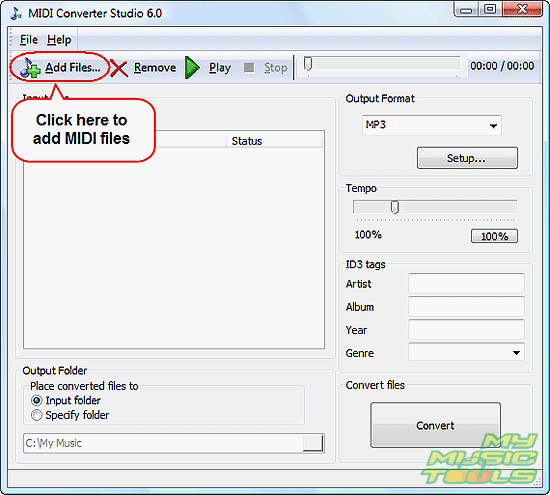
Click the leftmost "Add Files" button on the toolbar to get a usual "Open" dialog.
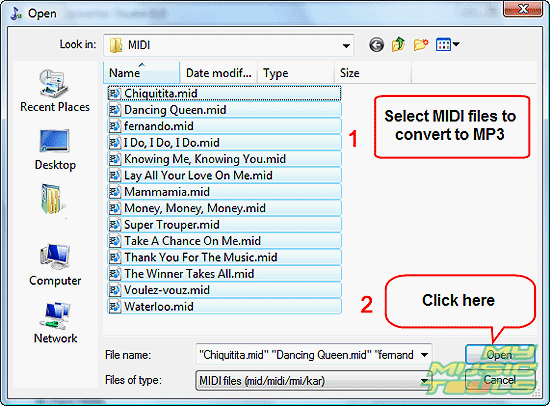
Browse to the folder where you keep your MIDI files, select those that you want to convert to MP3, click "Open".
Alternatively you can open the folder in Windows Explorer and drag and drop MIDI files into the main window if MIDI Converter Studio. Other file managers that support Drag&Drop can also be used.
Step 3: Fill out ID3 tags. Convert MIDI to MP3.
The files will be shown in the large white area of the program, the conversion list. You can preview the files by selecting them one by one from the list and clicking "Play" on the toolbar. To stop playing, click "Stop".
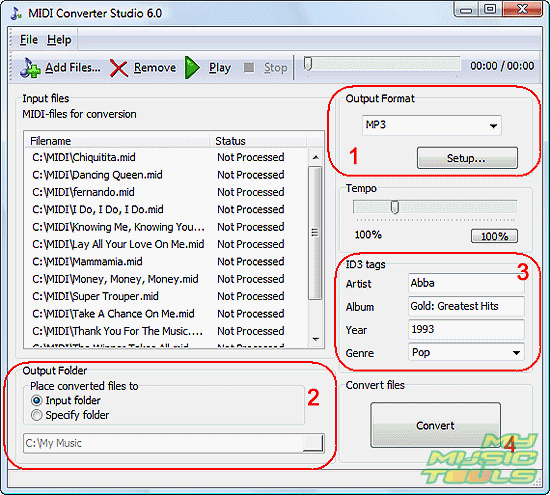
In the output format area (1), choose MP3 as the output format. You can adjust the format settings by clicking "Setup" in the same area. MIDI Converter Studio supports the whole range of MP3 bit rates and sample rates.
In the output folder area (2), specify a folder where converted files should be saved. There is an option to use the input folder, i.e. the folder where MIDI files are stored. If you add MIDI files from different folders and use this option, converted MP3 files will be sorted correspondingly.
In the ID3 tags area (3), fill out necessary fields. Note that the tags will be written to all converted files, so you should fill out only those fields that are common to all files in the list. If some files shouldn't have the tags, you can remove them from the list and convert them to MP3 later.
Finally, click the big "Convert" button in the right lower corner of the program (4) to start converting MIDI to MP3.
Instructions on how to load different SoundFonts you can find in the help.
The trial version of MIDI Converter Studio converts only 60 seconds of a file. If you are satisfied with the quality and features, you can register your copy and remove all limitations.


Search
Related
- How to convert multiple MIDI files into an MP3?
- How to play MIDIs on an iPhone?
- Play MIDI files on your iPod!
- How do I convert MIDI to WAV?
- How to convert MIDI to OGG?
- How to convert MIDI to WAV?
- How to convert MIDI to CDA?
- How to convert MIDI to MP3 using several SoundFonts?
- How to convert MIDI to WMA?
 How to convert MIDI to MP3
- MIDI to MP3 converter with ID3 tags support
- MIDI to Ringtone Converter
- How do I convert KAR to MP3?
- How do I convert MIDI to MP3?
- Fast MIDI to MP3 Converter 5.6 review
- How to convert a mid to mp3?
- ManiacTools Releases MIDI Converter Studio 4.6
- How do I edit MIDI files?
- WIDI Recognition System Professional 3.3 Review
- How do I convert MP3 to MIDI?
- Able MIDI Editor 1.3 review
Ask our expert
- How to share screen videos online?
- How to sort duplicate music files by ID3 tags?
- How to get quick updates on movies by director?
- How to convert multiple MIDI files into an MP3?
- How to rotate videos?
- How to convert WMA to WAV?
- How to play MIDIs on an iPhone?
- How to split an audio file into equal parts?
- How to split m4b audiobooks into chapters for free?
- How to convert videos for You Tube?
