




How do I record my favorite music from internet radio?
Introduction.
There are plenty of radio stations on the Internet. They represent all possible trends and currents in music. You can easily find a classics radio, a retro radio, pop, rock, top hits - whatever you can imagine. They surely play exactly the music that you like, at least from time to time.
But what if you want to record a certain song, or all songs of some artist? Maybe the pieces are not available at your favorite music shop anymore?
One solution would be to record internet radio as a whole stream, then listen to it, and cut out the songs that you need. However, that can be a quite time-consuming task.
Well, a better way exists. We will discuss an interesting internet radio recorder program, Radiotracker, that is able to hunt online radio stations for the songs that you put into your wish list. Of course, other ripping options are also available (for example, you can record a few radio streams simultaneously), but that option we will discuss some day later.
Please note that the wish list option works only with a registered version of Radiotracker.
Step 1: Download and install the program.
Download Radiotracker to a known location. Launch setup and follow on-screen instructions to install the application.
Step 2: Start Radiotracker. Create your wish list.
Start the program. The main window will be shown.
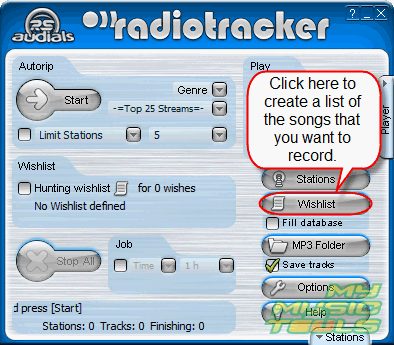
Click the highlighted (on the screen shot above) "Wishlist" button.
A new window appears. It will start retrieving information about artists and songs. There can be thousands of artists, so you may want to narrow down your search.
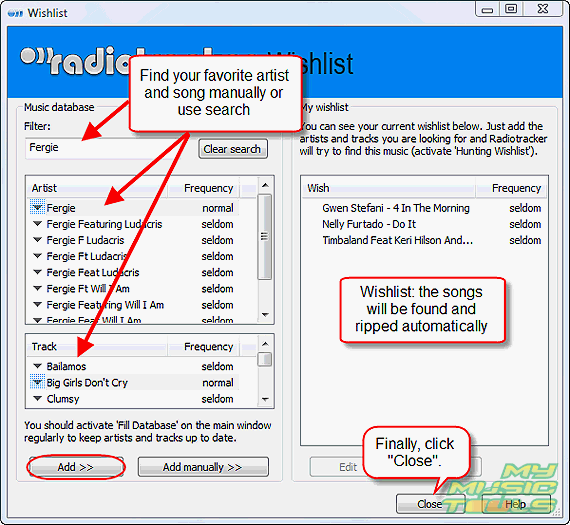
Just use filter to extract only relevant information. For example, we have typed "Fergie" to get all songs of the artist.
Now you can either add the artist to your wish list, or look for a particular track (left down) and add only that track. It is also possible to enter artist and track information manually.
After adding your favorite songs, just close the window.
Step 3: Start searching and wait for results.
Take a look at the main window again.
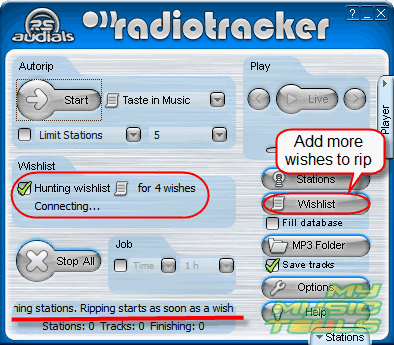
Under the "Autorip" tab you can see "Wishlist". Check the "Hunting wishlist" box. That's it.
The program will start to monitor online radio stations. If a song from the wish list is played, Radiotracker will record it automatically. So, you can just minimize the program to the taskbar and forget about it for a while, it will record your favorite music from internet radio automatically.
You should be aware that with fewer songs in the wish list the program will take more time to record anything. The more songs you put into the wish list the quicker Radiotracker starts to record anything.


Search
Related
Ask our expert
- How to share screen videos online?
- How to sort duplicate music files by ID3 tags?
- How to get quick updates on movies by director?
- How to convert multiple MIDI files into an MP3?
- How to rotate videos?
- How to convert WMA to WAV?
- How to play MIDIs on an iPhone?
- How to split an audio file into equal parts?
- How to split m4b audiobooks into chapters for free?
- How to convert videos for You Tube?
