




How do I stay anonymous in a webcam chat?
Introduction.
Communication is quite a valuable thing for human beings. By means of it we exchange ideas, experience, we grow wiser. The culture, the technology, the society itself wouldn't be possible without communication.
Maybe that's one of the reasons why the Internet is so popular. If offers communication without boundaries. There are countless forums, blogs, chats, where any visitor can express his or her own thoughts and find an appropriate company of like-minded people.
However, another great point of the Internet is anonymity. You can post your messages or just chat under any name or nickname. This gives you more freedom to express yourself (especially if you are a bit shy in the reality). This also may lead to funny situations described in many stories and movies, where a young pretty girl turns to be a mustached man, or something alike.
With introduction of video chats those situation should have become impossible, as you are able to see your partner. However, it's still possible to stay incognito, while making the partner think that he or she is seeing you.
Want to make a joke with your friend, or stay anonymous in a webcam chat? Let's take a look at a pretty special piece of webcam software, Webcam Morpher.
Step 1: Download and install the program.
Download Webcam Morpher to a known location. Run the downloaded package and follow on-screen instructions to install it.
Step 2: Start the program. Select a personality and go chatting.
Launch Webcam Morpher. Select a personality from the list on the right. If the preview is turned on (default), you will be able to see the resulting picture.
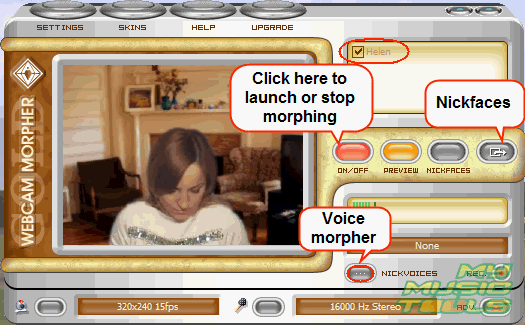
Use the voice morpher to make your voice unrecognizable. You can choose between different presets.
Now, let's start chatting.
To express an emotion, click the "Nickfaces" button and pick out an appropriate one from the list:

Alternatively, you can open an additional window and click an appropriate smile:

Your character moves, even if you don't select any emotion. The picture stays alive all the time.
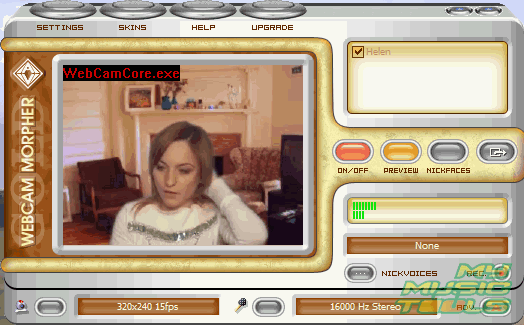
The trial version of the program is distributed with only one character and has some other limitations. You can add new characters by upgrading to the Gold version.


Search
Related
- How to share screen videos online?
- How to rotate videos?
- How to capture video?
- How do I convert AVI to Zune?
- Movavi VideoSuite 4.4 review
- How to record a screen video?
- How to make a video tutorial?
 How to add a watermark to your video?
- How to fix a blurred video?
- How to increase brightness of a dark video?
- How do I combine AVI episodes into a full-length professional looking movie?
- How do I stay anonymous in a webcam chat?
- How do I improve quality of videos and old movies?
- AVS Video Editor 3.4 review
- MOVAVI Releases EnhanceMovie 2.0
- MOVAVI Releases EnhanceMovie 1.3
- How to play MKV file?
- How to play any video?
Ask our expert
- How to share screen videos online?
- How to sort duplicate music files by ID3 tags?
- How to get quick updates on movies by director?
- How to convert multiple MIDI files into an MP3?
- How to rotate videos?
- How to convert WMA to WAV?
- How to play MIDIs on an iPhone?
- How to split an audio file into equal parts?
- How to split m4b audiobooks into chapters for free?
- How to convert videos for You Tube?
